
Embedded Onboarding
The same flow runs inside your product, and the participant never leaves your app or site.
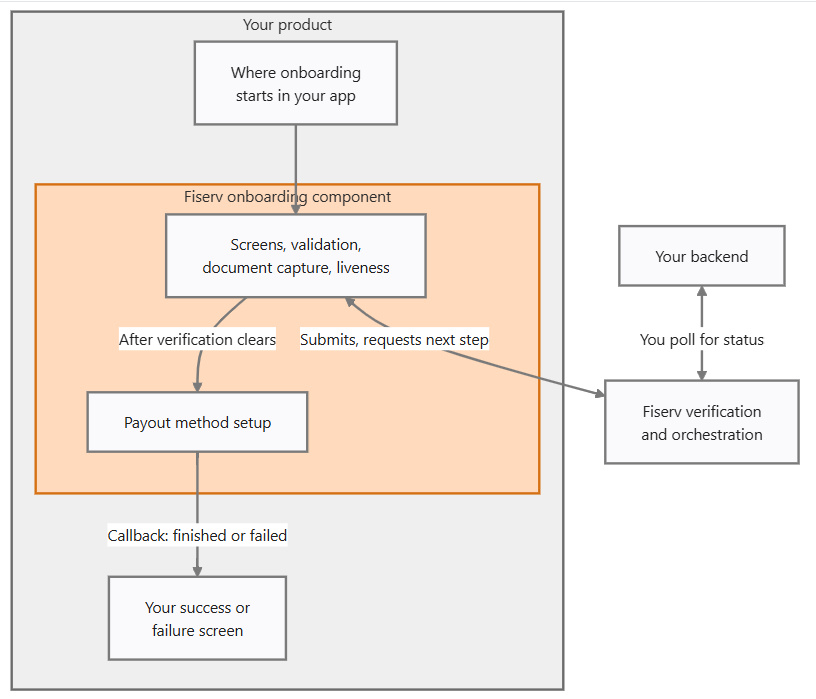
The callback determines what your interface displays. It is not the record; your backend retrieves status by requesting it on its own loop.
Branding
Components are embeddable with branding controls for color, typography, and border radius, and are delivered as a desktop and mobile web view and as native iOS and Android SDKs. The result presents as your product rather than as a Fiserv page inside a frame.
Component Responsibilities
The component runs the screens, the client-side validation, the API calls behind them, document capture, and the liveness check. Verification orchestration sits inside the component, including when to submit, what to request next, and how to interpret callbacks. Your platform does not sequence the verification.
Status Updates
The component emits a callback when the participant finishes or fails, which is your cue to render your own confirmation or error screen. Durable state is retrieved separately, so abandonment and resume follow the shared model. Treat the callback as an interface signal rather than as the record.
UX Responsibility Boundaries
| Your Business Platform | Fiserv |
|---|---|
| Where onboarding starts and how the participant reaches it | The onboarding screens, field validation, and error states inside the component |
| The container, page framing, and navigation around it | Document capture, liveness, and the verification calls |
| The success and failure screens after the callback | Status, resume state, and remediation prompts |
| Participant support and communications | The decision and its reason |
Payout method capture occurs after verification, in a separate component.
Testing Considerations
Sandbox testing should cover business and individual participant variants, a decline, a document request and the re-upload loop, abandonment and resume, the liveness step on a physical device, expiry and token refresh, and branding on native and web, as typography and border radius render differently across them.
Related Topics
- Hosted Onboarding – Use a Fiserv-hosted participant onboarding experience
- API-led Onboarding – Build and manage onboarding workflows using APIs