
Hosted Onboarding
Your platform hands the participant off to Fiserv by requesting a link. The participant completes onboarding in a Fiserv-run flow and returns to your experience on completion.
The link can be distributed by email, in-app, or portal, and your platform controls how it reaches the participant. Links carry an expiry, so a stale link is reissued rather than reused, and a returning participant resumes from where they left off.
The flow carries your business name, logo, and primary color. On completion the participant is redirected back to your environment.
Hosted hands the participant off and returns them afterwards. Embedded runs as a Fiserv layer inside your product. API-led leaves the screens with your platform and retains only verification behind them.
The rest of this section applies to all three.
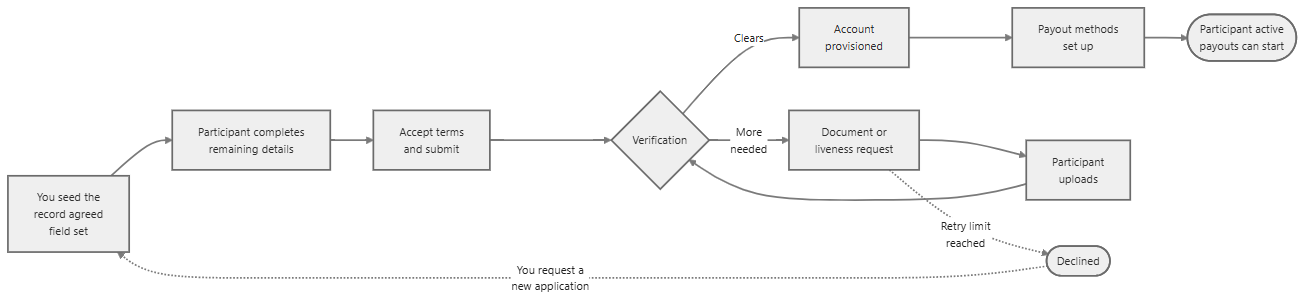
End to end, the process runs as follows:
Information Collection Responsibilities
Your platform seeds the record with the field set agreed during configuration, and Fiserv takes the application forward and collects what remains: business details, address, industry, ownership, personal details, phone verification, documents, and the liveness check.
The seed set is agreed in advance, and anything your platform sends carries into the flow so the participant is not asked for it again. Sensitive identity data and document images remain within the Fiserv flow and do not pass through your systems.
In the API-led model this split does not apply, as your platform collects and submits all information.
Verification Workflow
A business participant completes business and identity verification, while an individual participant completes identity verification only. The participant works through the flow, accepts the terms, and submits. Documents are requested only when the submitted data alone cannot clear the check, so a participant whose data clears typically never encounters an upload screen. Once verification passes, the account is provisioned and the participant sets up payout methods.
Remediation
Where additional information is required, the flow requests specific documents, a re-upload, or a primary-owner liveness check. Requests can repeat as verification narrows down what it requires, up to a set limit, after which the application is declined.
Those applications surface to your platform with the reason attached. Human review is part of the service: the Fiserv support team can investigate application issues, review uploaded documents, and make account updates where a case requires a person rather than another prompt.
Status Visibility
Drop-off is expected. The participant's position is held as state, the flow resumes from the last completed step, and your platform can read the current position at any point, which allows a stalled participant to be prompted with the appropriate message.
Dashboard Operations
The Control Center dashboard reports onboarding performance and common failure reasons by country, legal-entity type, integration type, and date range.
Related Topics
- Embedded Onboarding – Embed onboarding within your existing platform experience
- API-led Onboarding – Build and manage onboarding workflows using APIs